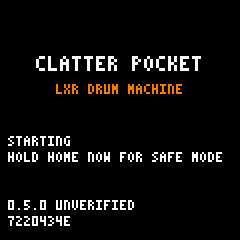
UNVERIFIED: EXPERIMENTAL Firmware 0.5.0 has passed emulator testing. It has never run on a physical FM-1. Status

CLATTER POCKET

CLATTER POCKET

A generative drum machine hiding inside your FM-1.

Seven voices of authentic LXR drum synthesis. Generative kits, evolving rhythms, live recording and melodic percussion, running directly on the M-VAVE FM-1.

SCLOCT−OCT+PLAYRECENVARPLFOSAVEPRESETSALGOSELECTHOMESEQEDITFXGLOKNOB 1KNOB 2KNOB 3KNOB 4MASTER
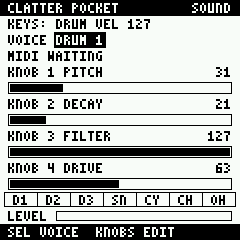
The FM-1, drawn from the emulator's panel map. The screen is firmware output read from the emulated LCD, not a photograph of a working device.

01 What it does

Authentic LXR synthesis

Synthesis running on the device, not sample playback. The LXR-02's open-source sound engine runs on the FM-1, compiled from the firmware's own DSP files. Seven drum tracks: DRUM 1, 2 and 3, SNARE, CYMBAL, CLOSED HAT and OPEN HAT. They are the LXR's seven triggers on its six voices, because the two hats share one.

Host tests match CLATTER's engine to within 3 steps of 16-bit audio.

Generative kits

Generate a complete kit, or a new sound for one instrument and leave the rest alone.

INIT and 16 factory kits, each a character the generator leans towards:

CLASSIC ANALOG DIGITAL INDUSTRIAL MINIMAL GLITCH TECHNO ELECTRO DUB NOISE METALLIC SOFT BROKEN ACID LO-FI CHAOS

Generative rhythms

Generate patterns in CLATTER's 11 rhythmic styles, regenerate one track, or mutate what is already there so it stays related.

MACHINE ELECTRO BREAKS JUNGLE HALFTIME BROKEN GARAGE INDUSTRIAL GLITCH POLYMETER DUB

Two keyboard modes

DRUM: each key plays an instrument, the same at every octave.

PITCH: the selected instrument chromatically. The patch does not change, so it returns exactly.

Live recording

Record drum performances and pitched percussion straight into the sequencer. Playing, hits overdub onto the nearest step. Stopped, enter and remove steps one at a time.

16 steps, seven tracks, a note per track on each step.

Saved on the device

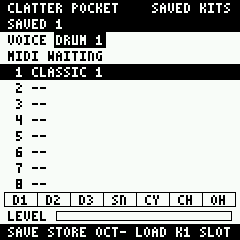
12 user kits and 12 user patterns in user Flash, surviving a restart.

A save is checked before it counts, and writes only to sectors found blank or already its own.

MIDI input

Note-ons play and record like the keys, at their own velocity, with General MIDI drum notes in DRUM.

Input over DIN was run in the emulator; USB and Bluetooth have not been exercised. There is no MIDI output, no thru and no external clock.

02 The panel

The buttons do the same thing on every page, and the knobs follow the page. Pick a control to see what it does, then hold SAVE to see its second action. SELECT is an encoder with no push switch, so SAVE is the modifier.

SCLOCT−OCT+PLAYRECENVARPLFOSAVEPRESETSALGOSELECTHOMESEQEDITFXGLOKNOB 1KNOB 2KNOB 3KNOB 4MASTER
All 23 controls as a table
ControlAloneWith SAVEDemo key
KEYSPlay. In DRUM each key is an instrument, the same at every octave. In PITCH every key plays the selected voice chromatically.A W S E D F T G Y H U J K O L P ; '
SCLSwitch the keyboard: KEYS: DRUM or KEYS: PITCH.2
OCT−PITCH: an octave down, to −3. DRUM: the keys hit softer: 40, 70, 100 or 127.Undo the last change to the pattern. Again, redo. On a saved-kits or saved-patterns page: load the selected slot.Z
OCT+PITCH: an octave up, to +3. DRUM: the keys hit harder.Undo the last change of kit. Again, redo.X
PLAYStart or stop the sequencer.Space
RECRecording on or off. Playing, a hit lands on the nearest step. Stopped, it lands on the selected step, and hitting it again removes it.R
ENVA new kit, in the character PRESETS chose.A new sound for the selected voice. The rest of the kit stays.3
ARPA new pattern, in the style ALGORITHM chose.A new pattern for the selected track. The other six stay.9
LFOMutate the pattern, at the strength set by MUTATE on GLOBAL.Mutate the selected track only.4
SAVEHold it to reach the second action of ENV, ARP, LFO, OCT−, OCT+, EDIT and SEQ. A tap locks or unlocks the selected track, so ARP and LFO leave it alone.On a saved-kits or saved-patterns page, a tap stores to the selected slot. Only when stopped.8
PRESETSThe kit: INIT, then 16 characters. Nothing is stored, so browsing never overwrites anything.↑ ↓
ALGORITHMThe pattern style, of 11: MACHINE, ELECTRO, BREAKS, JUNGLE, HALFTIME, BROKEN, GARAGE, INDUSTRIAL, GLITCH, POLYMETER, DUB., .
SELECTThe selected voice: DRUM 1 to 3, SNARE, CYMBAL, CL HAT, OP HAT. SAVE is the modifier, not SELECT.← →
HOMEMAIN: transport, tempo, swing, style, hits, a row of the pattern, the kit.7
SEQPATTERN: the step grid, velocity, tempo, swing.Saved patterns: 12 slots.0
EDITSOUND: pitch, decay, filter and drive of the selected voice.Saved kits: 12 slots.5
FXMIXER: level and pan of the selected voice.1
GLOGLOBAL settings. Press again for SYSTEM: version, build, CPU, overruns, clipping, heap.6
KNOB 1PATTERN: the selected step's velocity. SOUND: pitch. MIXER: level. GLOBAL: row.On a saved-kits or saved-patterns page: choose a slot.mouse
KNOB 2PATTERN: tempo. SOUND: decay. MIXER: pan. GLOBAL: value.mouse
KNOB 3PATTERN: swing. SOUND: filter.mouse
KNOB 4PATTERN: the selected step. SOUND: drive.mouse
MASTEROutput level.mouse

From POCKET-CONTROLS.md and POCKET-STORAGE.md. Encoder positions come from the emulator, not a device.

03 Try it now

The firmware itself, running on an emulated FM-1 in your browser. Keyboard, mouse or touch, with sound, and no hardware.

The browser emulator is fm1-emu by Joakim Eriksson. It runs the same package, with no changes for the demo.

TRY IN BROWSER

04 Quick start

In brackets, the key for the same control in the demo.

  1. Select a kit. Turn PRESETS ↑ ↓. INIT comes first, then the 16 factory kits.
  2. Generate a rhythm. Turn ALGORITHM , . to choose a style, then press ARP 9.
  3. Start playback. Press PLAY Space. Everything below works while it plays.
  4. Generate new sounds. Press ENV 3 for a kit. Hold SAVE 8 and press ENV for the selected voice only.
  5. Switch keyboard modes. Press SCL 2: KEYS: DRUM becomes KEYS: PITCH. OCT− Z and OCT+ X then change the octave.
  6. Record a pattern. Press REC R. Playing, what you hit lands on the nearest step. Stopped, it lands on the selected step, and hitting it again removes it.
  7. Save a kit. Stop first. Hold SAVE and press EDIT 8+5, choose a slot with KNOB 1, then tap SAVE. On a used slot, tap again while it says OVERWRITE. OCT− loads.
  8. Save a pattern. The same with SAVE and SEQ 8+0. A pattern keeps its tempo and swing, and plays with any kit.

The full guide is POCKET-CONTROLS.md.

05 Install

EXPERIMENTAL FIRMWARE

CLATTER Pocket has passed emulator testing but has not yet been verified on physical hardware.

Installing it replaces the FM-1’s stock instrument firmware. There is a risk of installation failure, loss of settings or requiring firmware recovery.

INSTALL EXPERIMENTAL FIRMWARE

How it works

The FM-1 updates over USB-MIDI SysEx, not WebUSB. The installer runs M-VAVE's own update code, unchanged, in Chrome or Edge on a computer:

  1. Connect the FM-1 by USB, and allow MIDI with SysEx.
  2. The page checks the device and the package.
  3. Review the version, the checksum and the warning, and confirm.
  4. Install, and keep it connected.
  5. It finishes when the FM-1 restarts and reports this exact build.

What it needs

  • An FM-1 running official fm1_open firmware. The updater will not go over any other firmware: from M-VAVE's stock firmware, install official Open with M-VAVE's workbench first.
  • Your projects, samples and voices backed up first with M-VAVE's workbench. That backup is not available while CLATTER Pocket is installed.
  • A USB data cable, with other MIDI software closed.

FIRST-HARDWARE-TEST.md is the procedure for the first installation.

06 Recovery

None of these routes has been tried with CLATTER Pocket on a device.

07 FAQ

What is CLATTER Pocket?

An independent, open-source firmware for the M-VAVE FM-1 that makes it a generative drum machine. It brings CLATTER's kit and rhythm generation and the LXR-02's sound engine to the device's own keys, buttons and screen.

Which hardware does it support?

The M-VAVE FM-1 only. M-VAVE does not document hardware revisions, so whether every unit behaves the same is not known.

Does it replace the original firmware?

Yes. It replaces the instrument and keeps the platform underneath: USB, Bluetooth, audio, the panel and the update protocol. The stock synth, its sequencer and effects are not available while it is installed, and neither is the workbench's backup of projects, samples and voices.

Can I restore the original firmware?

That is the design: the FM-1 reports itself as fm1_open, so M-VAVE's official workbench should be able to install official Open or V15 over it. It has not been done on a device. Read Recovery.

Does it use samples?

No sample playback. Every hit is synthesised live, and a kit is a set of parameters. The LXR engine does use wavetables and twelve short transient tables, as part of its synthesis.

Can I control it with MIDI?

Note input, yes: notes over DIN, USB and Bluetooth take the same path as the keys. Only DIN has been exercised, in the emulator. There is no MIDI output, no thru and no external clock.

Can I save patterns and kits?

Yes: 12 of each, in the FM-1's user Flash. Tested on a model of the chip and in the emulator, not on a device. Back up anything you cannot afford to lose; there is no export. GLOBAL settings are not saved.

Can I try it without hardware?

Yes. The demo runs the firmware in the FM-1 emulator, in your browser.

Is installation currently safe?

It is unproven. The firmware has never run on a physical FM-1, so its safety is unknown. The installer keeps M-VAVE's compatibility and integrity checks, but those cannot show how the firmware behaves on a device. Install it only if you accept that a firmware that does not start could need recovery tools, or M-VAVE's help.

08 Source and releases

BuildWhat it isWhere
Emulator buildFirmware 0.5.0, commit f97fbf3. Tested in the emulator. For the demo only.Runs in the demo
Experimental firmwareFirmware 0.5.0, commit f97fbf3. The same package as the emulator build. Unverified: it has passed emulator testing, not a device.The installer
Hardware-verified releaseA build tested on a device, end to end, with the way back tested too.None yet